Header

Heading for Article 1

This is the first section of my document.

I'll add another paragraph here too.

Subheading for Article 1

This is the first subsection of my document. I'd love people to be able to find this content!

Subsection

Pelientesque auctor nisi id magna consequat sagittis. Curabitur dapibus, enim sit amet elit pharetra tincidunt feugiat nist imperdiet. Ut convallis libero in urna ultrices accumsan. Donec sed odio eros.

Another subsection

Donec viverra mi quis quam pulvinar at malesuada arcu rhoncus. Cum soclis natoque penatibus et manis dis parturient montes, nascetur ridiculus mus. In rutrum accumsan ultricies. Mauris vitae nisi at sem facilisis semper ac in est.

2nd subheading for Article 1

This is the second subsection of my content. I think is more interesting than the last one.

Heading for Article 2

Text Formatting

HTML headings

Heading 2

Heading 3

Heading 4

Heading 5
Heading 6

Paragraph

I am a paragraph, oh yes I am.

Emphasis and importance

In HTML we use the <em> (emphasis) element to mark up such instances.

In HTML we use the <strong> (strong importance) element to mark up such instances. As well as making the document more useful, again these are recognized by screen readers and spoken in a different tone of voice.

Italic, bold and underline

<i>is used: Foreign words, taxonomic designation, technical terms, a thought...

<b>is used: Key words, product names, lead sentence...

<u>is used: Proper name, misspelling...

Others

Here below is a blockquote..

According to the MDN blockquote page:

The HTML <blockquote> Element (or HTML Block Quotation Element) indicates that the enclosed text is an extended quotation.

The quote element — <q> — is intended for short quotations that don't require paragraph breaks. -- MDN q page.

Another fairly common element you'll meet when looking around the WWW is <abbr> — this is used to wrap around an abbreviation or acronym, and provide a full expansion of the term (included inside a title attribute).

List

  • header
  • Navigation bar
  • Main content
    • Article 1
    • Article 2
      • Section 1
      • Section 2
      • Section 3
      • Section 4
        • Section 4.1
        • Section 4.2
        • Section 4.3
      • Section 5
      • Section 6
      • Section 7
      • Section 8
    • Div elements
  • Sidebar
  • Footer
  1. header
  2. Navigation bar
  3. Main content
    1. Article 1
    2. Article 2
      1. Section 1
      2. Section 2
      3. Section 3
      4. Section 4
        1. Section 4.1
        2. Section 4.2
        3. Section 4.3
      5. Section 5
      6. Section 6
      7. Section 7
      8. Section 8
    3. Div elements
  4. Sidebar
  5. Footer

Basic Table

Name Age Gender
Gabriel 13 Male
Elva 8 Female
Freida 5 Female

Buttons

Basic Form

Personal Information
Credit Card Information
Can we add you to our email mailing list?
Which topics interest you?

Figure/Image

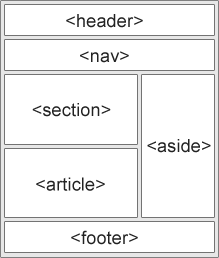
Semantic elements laying out a page by w3schools
An example of semantic element layout by w3schools.

The <figcaption> element tells browsers, and assistive technology that the caption describes the other content of the <figure> element.

SVG